> ## Documentation Index
> Fetch the complete documentation index at: https://braintrust.dev/docs/llms.txt
> Use this file to discover all available pages before exploring further.
# TypeSafe
> Trace TypeSafe Jev calls and inspect structured decisions, confidence, and probability distributions
[TypeSafe](https://typesafe.ai/) provides Jev, a model for structured decisions such as routing a support request, assessing urgency, or checking whether an answer meets a requirement. Trace calls from your application to inspect the questions, answers, and probability distributions behind those decisions.
For example, when a support ticket reaches the wrong team, inspect the routing decision to see whether the categories were ambiguous or Jev selected an incorrect answer with high confidence. Tracing records the decision as a question span. It does not automatically create an evaluation score or a Braintrust classification column.
Tracing
Setup
Requires Braintrust v3.34.0+ and `@typesafe-ai/sdk` v0.6.0 or later within v0.x. You need a TypeSafe account and API key.
```bash theme={"theme":{"light":"github-light","dark":"github-dark-dimmed"}}
pnpm add braintrust@^3.34.0 @typesafe-ai/sdk@^0.6.0
```
Set your [Braintrust API key](/docs/admin/authentication#api-authentication) and TypeSafe API key in your shell:
```bash theme={"theme":{"light":"github-light","dark":"github-dark-dimmed"}}
export BRAINTRUST_API_KEY=""
export TYPESAFE_API_KEY=""
```
For the EU data plane, also set `BRAINTRUST_API_URL` to `https://api-eu.braintrust.dev`. For a self-hosted deployment, use your data plane URL.
Auto-instrumentation
Use Braintrust's import hook to trace TypeSafe calls throughout your application.
Save this example as `trace-typesafe-auto.js`. It asks Jev to route a support request, assess its urgency, and identify whether it mentions a duplicate charge.
```javascript title="trace-typesafe-auto.js" theme={"theme":{"light":"github-light","dark":"github-dark-dimmed"}}
import { initLogger } from "braintrust";
import { TypeSafeClient, choice, noul, score } from "@typesafe-ai/sdk";
const logger = initLogger({ projectName: "typesafe-example" });
const client = new TypeSafeClient();
const response = await client.systemOne({
state: "I was charged twice. Please refund the duplicate charge today.",
questions: {
category: choice("Which team should handle this request?", {
billing: "Payments and refunds",
technical: "Software problems",
other: "Other requests",
}),
urgency: score("How urgent is this request?", [
"routine",
"soon",
"urgent",
]),
duplicate_charge: noul("Does the customer report a duplicate charge?"),
},
});
console.log(response.answers);
await logger.flush();
```
```bash theme={"theme":{"light":"github-light","dark":"github-dark-dimmed"}}
node --import braintrust/hook.mjs trace-typesafe-auto.js
```
The auto-instrumentation example uses plain JavaScript so `node --import` can run the file directly. The Braintrust APIs work the same in TypeScript projects — compile your TypeScript to JavaScript, then run the compiled file with the import hook.
If you're using a bundler, see [Trace LLM calls](/docs/instrument/trace-llm-calls#auto-instrumentation) for plugin and loader setup.
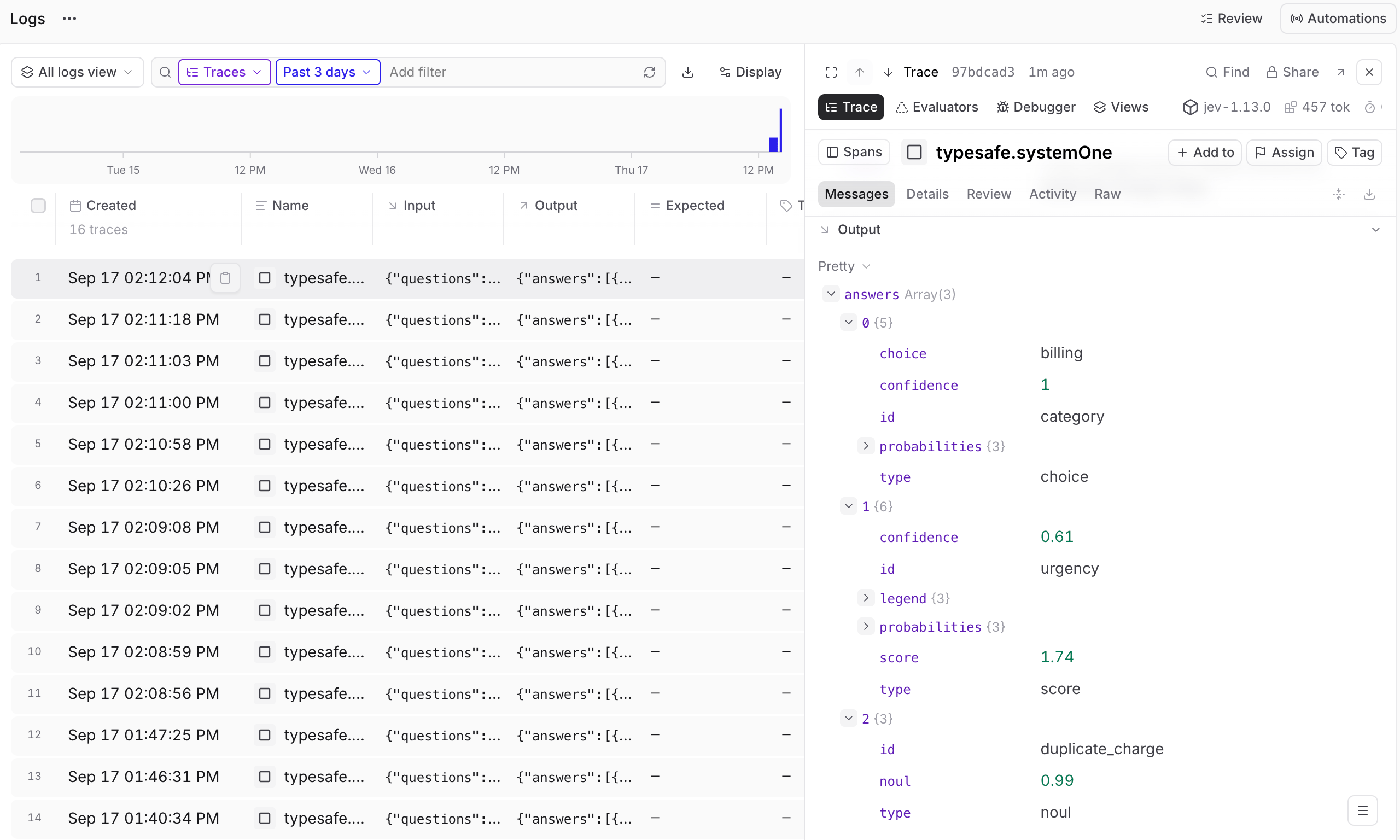
Go to your project's [** Logs**](https://www.braintrust.dev/app/~/logs) and select the `typesafe.systemOne` span to [inspect the decisions](#inspect-jev-decisions).
Manual instrumentation
Wrap individual clients with `wrapTypeSafe()` to choose which TypeSafe calls to trace.
```typescript TypeScript theme={"theme":{"light":"github-light","dark":"github-dark-dimmed"}}
import { initLogger, wrapTypeSafe } from "braintrust";
import { TypeSafeClient, choice } from "@typesafe-ai/sdk";
const logger = initLogger({ projectName: "typesafe-example" });
const client = wrapTypeSafe(new TypeSafeClient());
const response = await client.systemOne({
state: "I was charged twice. Please refund the duplicate charge today.",
questions: {
category: choice("Which team should handle this request?", {
billing: "Payments and refunds",
technical: "Software problems",
other: "Other requests",
}),
},
});
console.log(response.answers.category.choice);
await logger.flush();
```
Manual instrumentation (AI SDK)
If your application calls Jev through AI SDK's `experimental_evaluate()`, wrap the `ai` module with `wrapAISDK()`. This requires AI SDK v7.0.103 or later within v7. In your existing AI SDK application, replace the direct import of `experimental_evaluate()` with the wrapped export:
```typescript TypeScript theme={"theme":{"light":"github-light","dark":"github-dark-dimmed"}}
import * as ai from "ai";
import { initLogger, wrapAISDK } from "braintrust";
initLogger({ projectName: "typesafe-example" });
const { experimental_evaluate } = wrapAISDK(ai);
```
Call the wrapped `experimental_evaluate()` with your existing evaluation model, state, and questions. Braintrust records an `evaluate` span with type `question`. The import hook also instruments this function. For evaluation calls, use the wrapper or import hook rather than relying only on AI SDK telemetry callbacks.
What Braintrust traces
For each `TypeSafeClient.systemOne()` call, Braintrust records a `typesafe.systemOne` span with type `question`:
* Input state and questions, including question identifiers, instructions, and criteria
* Structured answers, including choices, scores, Noul values, and returned confidence and probabilities
* Model and provider metadata
* Token usage reported by TypeSafe and request duration
* Errors raised by the call
Tracing resources
* [TypeSafe client SDKs](https://docs.typesafe.ai/sdk)
* [Vercel AI SDK integration](/docs/integrations/sdk-integrations/vercel)
* [Customize traces](/docs/instrument/trace-application-logic)
Tracing
Setup
Requires Braintrust v0.41.0+ and `typesafe-sdk` v0.6.0+. You need a TypeSafe account and API key.
```bash uv theme={"theme":{"light":"github-light","dark":"github-dark-dimmed"}}
uv add "braintrust>=0.41.0" "typesafe-sdk>=0.6.0"
```
```bash pip theme={"theme":{"light":"github-light","dark":"github-dark-dimmed"}}
pip install "braintrust>=0.41.0" "typesafe-sdk>=0.6.0"
```
Set your [Braintrust API key](/docs/admin/authentication#api-authentication) and TypeSafe API key in your shell:
```bash theme={"theme":{"light":"github-light","dark":"github-dark-dimmed"}}
export BRAINTRUST_API_KEY=""
export TYPESAFE_API_KEY=""
```
For the EU data plane, also set `BRAINTRUST_API_URL` to `https://api-eu.braintrust.dev`. For a self-hosted deployment, use your data plane URL.
Auto-instrumentation
Call `braintrust.auto_instrument()` before creating your TypeSafe clients to trace synchronous and asynchronous calls.
Save this example as `trace_typesafe.py`. It asks three questions about the same support request.
```python title="trace_typesafe.py" theme={"theme":{"light":"github-light","dark":"github-dark-dimmed"}}
import braintrust
from typesafe_sdk import Choice, Noul, Score, TypeSafeClient
logger = braintrust.init_logger(project="typesafe-example")
braintrust.auto_instrument()
with TypeSafeClient() as client:
response = client.system_one(
state="I was charged twice. Please refund the duplicate charge today.",
questions={
"category": Choice(
instructions="Which team should handle this request?",
criteria={
"billing": "Payments and refunds",
"technical": "Software problems",
"other": "Other requests",
},
),
"urgency": Score(
instructions="How urgent is this request?",
criteria=["routine", "soon", "urgent"],
),
"duplicate_charge": Noul(
instructions="Does the customer report a duplicate charge?",
),
},
)
print(response.answers)
logger.flush()
```
```bash theme={"theme":{"light":"github-light","dark":"github-dark-dimmed"}}
python trace_typesafe.py
```
Go to your project's [** Logs**](https://www.braintrust.dev/app/~/logs) and select the `typesafe.systemOne` span to [inspect the decisions](#inspect-jev-decisions).
Manual instrumentation
Wrap individual clients with `wrap_typesafe()`. This example uses the asynchronous client. The same wrapper supports `TypeSafeClient` for synchronous calls.
```python Python theme={"theme":{"light":"github-light","dark":"github-dark-dimmed"}}
import asyncio
import braintrust
from braintrust.integrations.typesafe import wrap_typesafe
from typesafe_sdk import AsyncTypeSafeClient, Choice
logger = braintrust.init_logger(project="typesafe-example")
async def main():
async with wrap_typesafe(AsyncTypeSafeClient()) as client:
response = await client.system_one(
state="I was charged twice. Please refund the duplicate charge today.",
questions={
"category": Choice(
instructions="Which team should handle this request?",
criteria={
"billing": "Payments and refunds",
"technical": "Software problems",
"other": "Other requests",
},
),
},
)
print(response.answers["category"].choice)
asyncio.run(main())
logger.flush()
```
What Braintrust traces
For each synchronous or asynchronous `system_one()` call, Braintrust records a `typesafe.systemOne` span with type `question`:
* Input state and questions, including question identifiers, instructions, and criteria
* Structured answers, including choices, scores, Noul values, and returned confidence and probabilities
* Model and provider metadata
* Token usage reported by TypeSafe and request duration
* Errors raised by the call
Tracing resources
* [TypeSafe quickstart](https://docs.typesafe.ai/introduction/quickstart)
* [Customize traces](/docs/instrument/trace-application-logic)
## Inspect Jev decisions
Select a question span in a trace and use the **Pretty** view for its input and output. The input shows the state sent to Jev and each question's instructions and criteria. The output matches answers to questions by identifier, so you can inspect the decision alongside the question that produced it.
The SDK integration records questions and answers as lists. Each entry's `id` comes from its key in your request, such as `category` or `urgency` in the examples above. Use these identifiers to follow a question from its criteria to its answer.
 ### Interpret the answer
| Answer type | What to inspect |
| ----------- | -------------------------------------------------------------------------------------------------------------------- |
| Noul | **Probability of yes**, displayed as a percentage on a scale from no to yes. |
| Choice | The selected option, per-option probabilities, and confidence when returned. |
| Score | The numeric result on the rubric's scale, level descriptions, per-level probabilities, and confidence when returned. |
For the support-request example, inspect `category` to see the selected team and alternatives, `urgency` to see the result on the `routine` to `urgent` scale, and `duplicate_charge` to see the probability that the request describes a duplicate charge. Model responses can vary.
### Understand confidence
Per-option probabilities show how Jev distributes probability across the possible answers. [TypeSafe confidence](https://docs.typesafe.ai/confidence) summarizes how concentrated that distribution is. It is separate from the selected option's probability and from an evaluation score. High confidence does not guarantee a correct decision.
A Jev Score answer uses its own rubric scale: three levels correspond to a scale from `0` to `2`, not a normalized Braintrust score.
### Interpret the answer
| Answer type | What to inspect |
| ----------- | -------------------------------------------------------------------------------------------------------------------- |
| Noul | **Probability of yes**, displayed as a percentage on a scale from no to yes. |
| Choice | The selected option, per-option probabilities, and confidence when returned. |
| Score | The numeric result on the rubric's scale, level descriptions, per-level probabilities, and confidence when returned. |
For the support-request example, inspect `category` to see the selected team and alternatives, `urgency` to see the result on the `routine` to `urgent` scale, and `duplicate_charge` to see the probability that the request describes a duplicate charge. Model responses can vary.
### Understand confidence
Per-option probabilities show how Jev distributes probability across the possible answers. [TypeSafe confidence](https://docs.typesafe.ai/confidence) summarizes how concentrated that distribution is. It is separate from the selected option's probability and from an evaluation score. High confidence does not guarantee a correct decision.
A Jev Score answer uses its own rubric scale: three levels correspond to a scale from `0` to `2`, not a normalized Braintrust score.